

I'd been meaning to try out Prisma, a tool that provides handy features for working with databases, and since the next major version is under active development and available as a preview, I decided to build a simple REST API with it to see how it feels to use. (I've never touched the current version 1 at all.)
About Prisma2
According to the README, Prisma2 consists of the following tools.
- Prisma Client JS: Type-safe and auto-generated database client ("ORM replacement")
- Prisma Migrate: Declarative data modeling and migrations
- Studio: Admin UI to support various database workflows
Of these, I tried out Prisma Migrate but ran into a lot of errors, so I gave up on using it this time (using 2.0.0-preview020.1). There were cases where it worked fine, and from that experience it seemed like being able to run migrations based on a Prisma schema could be quite convenient. Issues seem to be actively worked on, so I'll try it again a bit later.
- Right after writing this article, 2.0.0-preview020.2 was released, and Prisma Migrate seemed to work well with it, so I tried it out. (I've added a "When using Prisma Migrate" section.)
- As of January 2020, bug fixes seem to be shipped frequently. I'm not sure whether this content will still be valid by the time of the official release, but I'd like to keep following along.
Below, to try out Prisma2, I implemented a REST API for managing TODOs — a common example — using a client generated by Prisma Client JS together with Express.
The final code is in the following repository, so please refer to it when actually running the commands.
Setting up the database (without using Prisma Migrate)
As mentioned above, I gave up on using Prisma Migrate, so I spun up a PostgreSQL container with Docker and created the tables in advance. (If you want to use Prisma Migrate, see the section added at the end of the article.)
When you bring up the container with docker-compose, init.sql runs and creates the User and TodoItem tables.
$ docker-compose up -d
CREATE TABLE "User" (
    user_id bigserial PRIMARY KEY,
    name varchar(100) NOT NULL
);

CREATE TABLE "TodoItem" (
    todo_id bigserial PRIMARY KEY,
    user_id bigint NOT NULL REFERENCES "User" (user_id) ON DELETE CASCADE,
    text text NOT NULL
);

CREATE INDEX todo_item_user_id_idx ON "TodoItem" (user_id);
This lets you access the running PostgreSQL container at localhost:5432.
You can spin up the database locally, and MySQL or SQLite work too, so adapt this to your own environment.
Setting up the Prisma project
Initialization
Initialize the Prisma project with the following command.
$ npx prisma2 init .
Here I'm running this against the current directory, but if you want to create a new directory you can specify it like init new-project.
Also, if you have prisma2 installed globally, you can run it like this instead:
$ prisma2 init .
Updating the schema and generating the client
prisma/schema.prisma is generated during initialization, so rewrite it as follows to connect to the database you set up.
generator client {
  provider = "prisma-client-js"
}

datasource db {
  provider = "postgresql"
  url      = "postgresql://prisma:prisma@localhost:5432/prisma?schema=public"
}
In this state, running the introspect command generates models from the database tables and updates the schema.
$ prisma2 introspect
generator client {
  provider = "prisma-client-js"
}

datasource db {
  provider = "postgresql"
  url      = "postgresql://prisma:prisma@localhost:5432/prisma?schema=public"
}

model TodoItem {
  text    String
  todo_id Int    @id
  user_id User
}

model User {
  name      String
  user_id   Int        @id
  todoItems TodoItem[]
}
Looking at the updated schema, the User and TodoItem tables I created beforehand have been brought in as models.
With the schema in this state, generate the client code based on it.
$ prisma2 generate
The client code is generated under node_modules, and since that's normally gitignored, you shouldn't see any diff in git.
At this point you should be able to use the client code.
Implementing the API
I based the overall structure and code on the following sample project, so I'll just briefly cover the implementation.
About the PRIMARY KEY
For example, to add a User, the sample project has code like this:
  const result = await prisma.users.create({
    data: { ...req.body },
  })
I want user_id to be assigned automatically, but if you only provide name in the request, you get an error saying user_id is missing.
I resolved this by adding @default(autoincrement()) to the field in the schema that corresponds to the PRIMARY KEY. Directly editing a file generated by the tool isn't great etiquette, but it looks like this will be supported as a feature eventually, so I'm hopeful for the future here.
Adding an endpoint
An endpoint to add a User can be written like this. (Error handling and authentication should really be done more properly in practice.)
app.post(`/users`, async (req, res) => {
  try {
    const result = await prisma.users.create({
      data: { ...req.body },
    })
    res.json(result)
  } catch (err) {
    console.error(err)
    res.sendStatus(400)
  }
})
Basically, the generated client provides methods like prisma.models.create and prisma.models.findOne for each model, so if you've used another ORM before, you should be able to get a rough sense of how to use it.
Expressing relations takes some getting used to, but overall I thought it was pretty easy to use.
Prisma Studio
Finally, I tried out Prisma Studio, which can be used as an admin UI for the database.
If everything up to this point is set up, you can open the admin UI with a single command. (Currently you need to specify the --experimental option.)
$ prisma2 studio --experimental
Running the command lets you open Prisma Studio at localhost:5555.
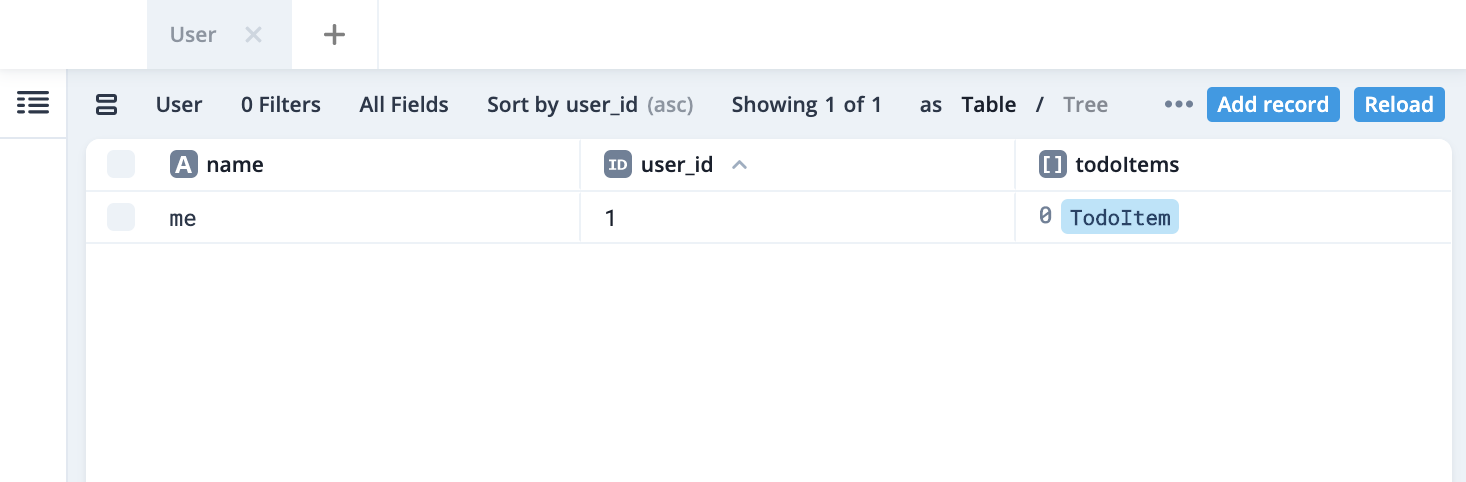
I was able to check existing data and create new records. At a glance it doesn't seem all that different from typical GUI tools, but maybe more useful features will show up down the line.
Summary
I built a simple REST API using Prisma2.
Since it's currently a preview version, there's a sense that some bugs remain and some features are still missing, but I also got the feeling that the functionality each tool provides could be genuinely useful in the API development process.
I remember that in the past, when I tried out Express, I'd get stuck just choosing migration and ORM tools. Prisma2 might solve that headache.
The timing differs a bit between them, but each tool is apparently scheduled to have an official release sometime during 2020, so I plan to keep an eye on things and try it out on a small project.
When using Prisma Migrate
I also tried out the pattern of defining the schema and running migrations using Prisma Migrate.
The basic usage is fairly close to other migration tools.
- Generating a migration file Update
schema.prisma(add models, add fields, etc.) Runprisma2 migrate save --experimentalto generate a migration file underprisma/migrationsbased on the schema diff - Applying a migration Run
prisma2 migrate up --experimentalto apply the migration diff - Rolling back a migration Run
prisma2 migrate down --experimentalto roll back a migration
After migrating, all you need to do is run the generate command to generate the client and use it.
I haven't looked much at how to write the schema itself yet, but if the schema's expressiveness improves, this pattern might become viable for real-world use as well.


