

Lately we've mostly been using Next.js for frontend application development here as well. When we use AWS for the cloud, we often host on Amplify, but when we tried to deploy a monorepo-managed Next.js (App Router) app, we ran into a few snags — so here's a summary.
Repository Layout Assumed in This Post
In this case, we manage applications for different user groups across multiple repositories within a monorepo. The shared UI is managed in the packages/ui directory, so it can be imported from each app.
We're using the official sample repository (also listed in the references) as our reference.
The repository structure is as follows:
├── README.md
├── amplify.yml
├── apps
│   ├── web // Directory for the general-user-facing application
│   │   ├── README.md
│   │   ├── next.config.js
│   │   ├── package.json
│   │   ├── postcss.config.js
│   │   ├── public
│   │   ├── src
│   │   │   ├── app
│   │   │   │   ├── omitted
│   │   │   │   ....
│   │   │   │   └── page.tsx
│   │   │   ├── components
│   │   │   ├── features // Contains custom hooks and other feature-related code
│   │   │   └── styles
│   │   ├── tailwind.config.ts
│   │   ├── tsconfig.json
│   │   └── yarn.lock
│   └── admin // Directory for the admin-facing application. Structure is the same as web, so omitted here
├── package.json
├── packages           // Directory holding files shared across applications (config files, UI components, etc.)
│   ├── eslint-config-custom
│   ├── tailwindconfig
│   ├── tsconfig
│   └── ui
├── turbo.json
└── yarn.lock
1. Change the amplify.yml Configuration
The default yml has no appRoot setting, but to use it with a monorepo, you need to add an appRoot entry for each application and configure environment variables on the Amplify side. We're using Turborepo as our build system here, so please adapt the build commands as needed for your own environment.
The key point here is that when the yml is written as below, you also need to set the environment variable AMPLIFY_MONOREPO_APP_ROOT = apps/web.
version: 1
applications:
  - appRoot: apps/web
    frontend:
      phases:
        preBuild:
          commands:
            - nvm use 18
            - node -v
            - yarn
        build:
          commands:
            - npx turbo run build --filter=web
      artifacts:
        baseDirectory: .next
        files:
          - "**/*"
      cache:
        paths:
          - node_modules/**/*
  - appRoot: apps/admin
    frontend:
      phases:
        preBuild:
          commands:
            - nvm use 18
            - node -v
            - yarn
        build:
          commands:
            - npx turbo run build --filter=admin
      artifacts:
        baseDirectory: .next
        files:
          - "**/*"
      cache:
        paths:
          - node_modules/**/*
2. Change the Amplify Infrastructure Settings
This is the part that took me the longest to figure out. When you create an application from the Amplify console and select monorepo, the infrastructure gets built with the platform set to "Web." Check the red-boxed area in the image below to see your current infrastructure state.
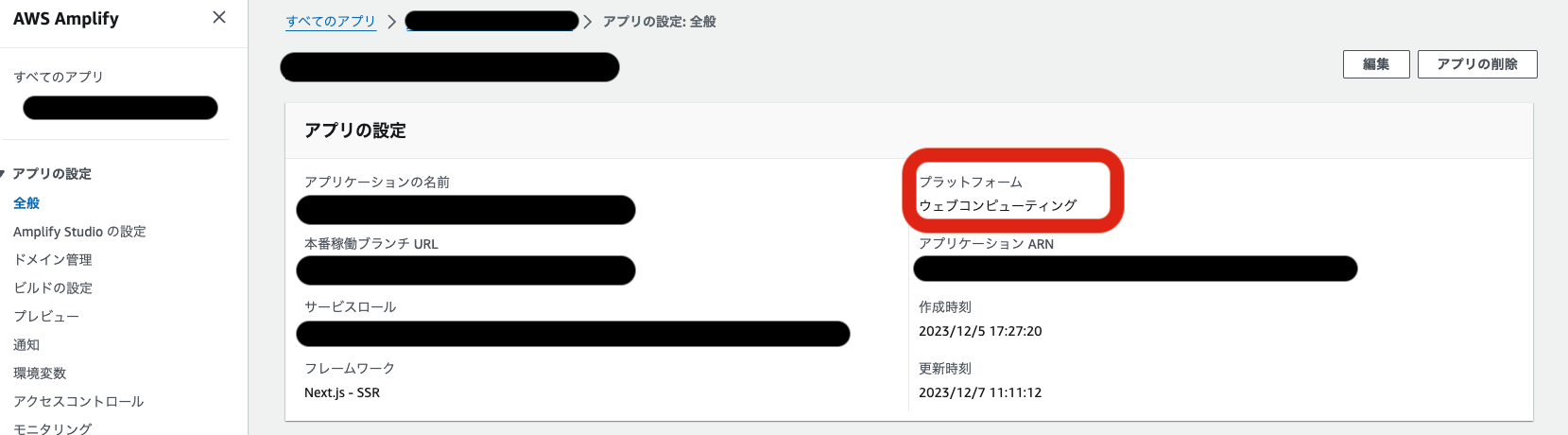
Since we're using Next.js in SSR mode here, we need to change it to "Web Compute." So we change the app and branch settings with the following commands:
# Change the Amplify App's infrastructure setting to "WEB_COMPUTE"
$ aws --profile {AWS_PROFILE} amplify update-app --app-id {APPLICATION_ID} --platform WEB_COMPUTE --region ap-northeast-1

# Change the Amplify Branch's infrastructure setting to "Next.js - SSR"
$ aws --profile {AWS_PROFILE} amplify update-branch --app-id {APPLICATION_ID}  --branch-name develop --framework 'Next.js - SSR' --region ap-northeast-1
Wrap-up
With the settings above in place, we were able to deploy to Amplify successfully. We hit a bit of a snag this time, but I really like Amplify — it also makes it easy to set up things like building an environment for every pull request, which lowers the cost of frontend review.
By the way, we're using Next.js 13 here, but if you use Next.js 14, you'll need to change the image due to Node.js's minimum support requirements, among other things. The following article may be helpful in that case:
Zenn: Tried out the new Amplify Hosting with a Next.js 14 app
Wishing you a great frontend development life 🙌


